
Changelog

What's new in GameInDev. Currently Beta v0.7.2.

v0.7.2

Update 0.7.2 — Faster everyday planning

2026-10-10

Plan your next steps with fewer clicks and keep your workspace easier to navigate.

Faster roadmap planning

  • Update tasks in place: Choose To do, In progress or Done directly from a task row, without opening the full editor.
  • Find the work that matters: Search by text, status and assignee. Use Assigned to me or Hide completed to focus your view.
  • Drag milestones directly: Reorder using the dots beside a milestone, without entering a separate Reorder mode. Nearby rows move as you drag, numbering previews the new order, and releasing saves the change.
  • Move work with fewer steps: Move tasks between milestones and milestones between phases through focused destination pickers.
  • Quick add in context: Start with a relevant milestone and phase already selected, then change them if needed.
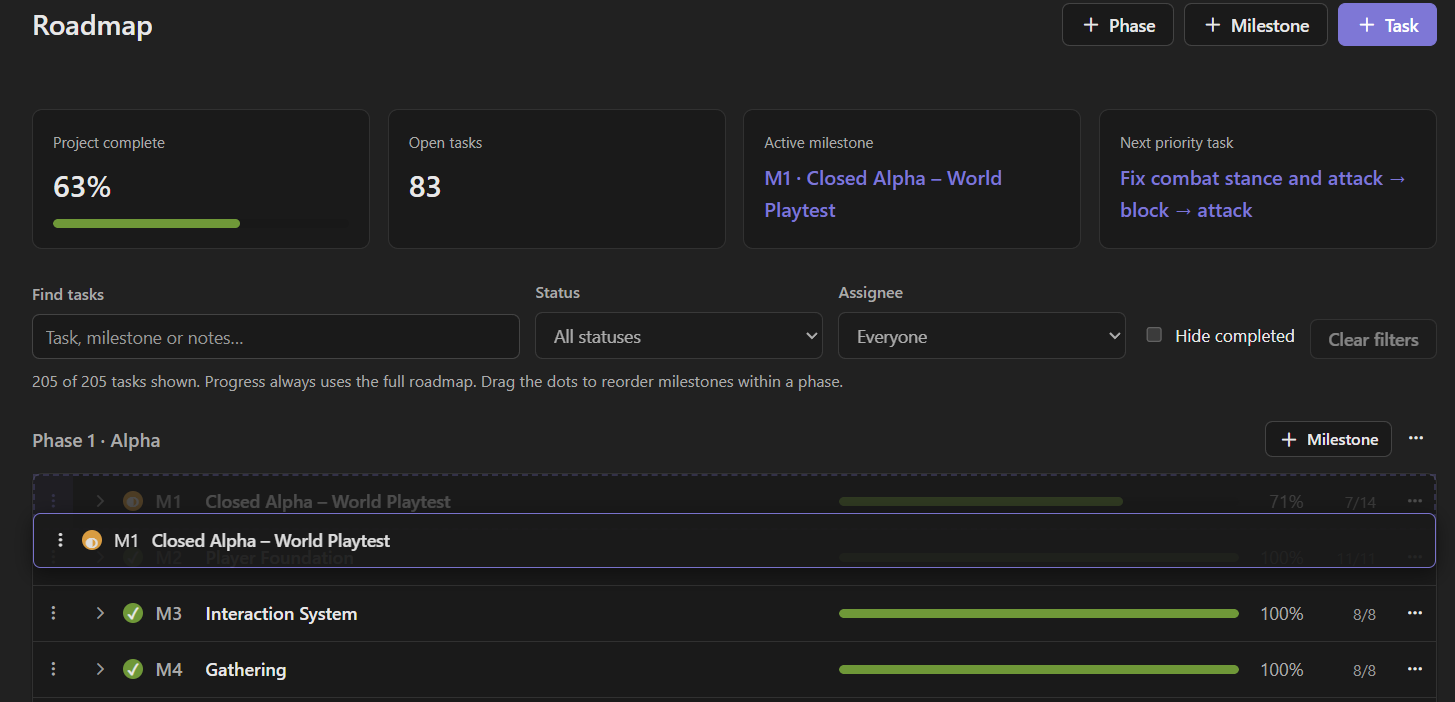
Roadmap task filters and a milestone being dragged with a live preview of its new position.

Drag a milestone to preview its new position before releasing it.

A sidebar that works your way

  • Arrange your Content: Drag Items, NPCs and custom collections into the order that suits your project. Project owners and administrators control this shared order.
  • Keep navigation compact: Collapse Project, Content, Media and other categories when you do not need them. Your personal view is remembered separately for each project.
  • Less clutter: Successful Content reordering no longer leaves a permanent confirmation message in the sidebar.
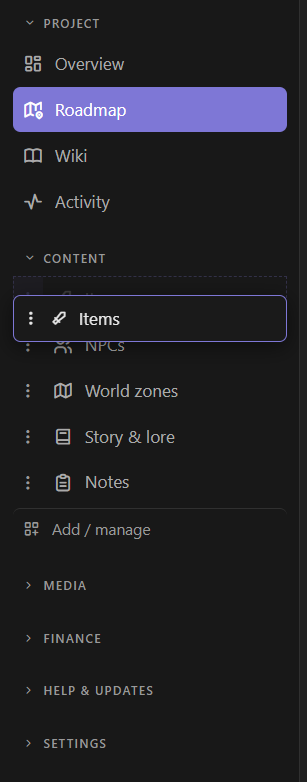
Content sidebar with Items being dragged and unused navigation categories collapsed.

Arrange your Content sidebar and collapse the categories you are not using.

Clearer, more dependable editing

  • In progress is now used consistently instead of Partial.
  • Roadmap status changes, moves and edits warn when another tab has changed the same work, rather than silently overwriting newer changes.
  • Keyboard alternatives, Escape to cancel dragging and improved mobile controls keep these workflows accessible.
v0.7.1

Update 0.7.1 — Reviews & the GameInDev Roadmap

2026-09-17

Share your experience and explore what’s next for GameInDev.

Rate GameInDev

  • Share your feedback: Leave a 1–5 star rating and an optional comment from Help & updates → Rate GameInDev.
  • Stay in control: Update or delete your review whenever you like.
  • Private by default: Only you and site administrators can see your review unless you allow public use.
  • Optional public sharing: Allow your display name, rating and comment to appear on the GameInDev website and your rating to count toward a future public average. Withdraw permission by updating or deleting your review.

Explore the GameInDev Roadmap

  • Find the GameInDev roadmap under Help & updates to explore planned improvements and their current status.
  • Our near-term focus is refining the existing experience, with playtesting and community feedback planned for the 0.8.x series.

Fixes

  • Project owners and project administrators with wiki editing permissions can now delete wiki pages.
v0.7.0

Major Update 0.7.0 — Flexible Collections & Faster Planning

2026-09-12

Make GameInDev fit the way you work, with more flexible collections, quicker roadmap editing and a customizable Overview.

Collections that work your way

  • More custom collections on Free: The five-collection limit has been removed. Existing project, entry and storage limits remain unchanged.
  • Filters from your own fields: Use Select, Multi-select and Number fields as filters, including number ranges.
  • Choose filters and columns independently: Keep a field available as a filter without displaying it as a table column.
  • Customize Item options: Define your project’s own Type and Rarity options. Renaming an option also updates existing items.
  • Choose your icons: Pick icons for custom collections and sidebar links from a searchable icon library.

Faster planning and a personal Overview

  • Roadmap actions where you need them: Create, edit, move, reorder and delete phases, milestones and tasks directly from their action menus.
  • Customize your Overview: Choose which cards appear, with preferences saved separately for each project. Restore the default layout at any time.
  • Less onboarding clutter: Getting Started hides when complete. You can also hide it manually or reopen it from Customize overview.
  • Consistent project focus: Daily brief and Overview now focus on the same milestone.
  • Improved roadmap layouts on smaller screens.

Help and updates inside your workspace

  • Help stays in your project: Browse Help & FAQ without leaving your workspace.
  • News & updates: Find product announcements and release notes in the new Help & updates section.
  • Support conversations now show the latest reply first.
  • Updated Claude and OpenAI model choices for Loke.

Fixes and improvements

  • Collection forms retain your entries when validation fails or a save conflict occurs.
  • Deleting a collection entry now asks for confirmation.
  • NPC search correctly opens the selected character when you are already on the NPC page.
  • Wiki dialogs now display validation errors when saving fails.
v0.6.0

Smoother planning, recovery and support

2026-09-08
  • Workspace navigation makes it easier to find project tools, personal settings and help, with improved readability on small screens.
  • Resource Graph and Narrative Flow show saving progress, let you retry failed saves or download a draft, and warn before you leave unsaved work.
  • Conflicting graph edits and project switches in another tab are caught before they can overwrite newer work or save to the wrong project.
  • Viewer access consistently keeps project content read-only, including changes requested through Loke.
  • Resend verification and recover your password from clearer account screens. Project invitations stay with you through verification, password reset and sign-in.
  • Personal Loke settings show which API key is in use and keep your preferences attached to your account.
  • Follow support requests as conversations with replies, status updates, unread indicators and image attachments. Your requests stay available when you switch projects.
  • Search Help & FAQ for answers about accounts, projects, Loke and support.
  • Review the impact before deleting an account or project, with shared files and contributions in other projects preserved.
v0.5.0

A more open GameInDev beta

2026-07-31
  • Explore a real GameInDev workspace directly from the product page without signing in
  • Create a free beta account without an invite, verify your email and securely reset a forgotten password
  • Publish an opt-in project page with a roadmap, updates and studio links under your own studio handle
  • Plan branching story, quest and dialogue routes in the new Narrative Flow
  • Start the day with a private project brief based on your recent progress and current roadmap
  • Download a machine-readable export of your account and project data from your profile
  • The public demo now explains unavailable actions in place instead of sending visitors to an error page
  • GameInDev now uses its new product icon in browser tabs and saved shortcuts
  • The public site, account workspace and live demo now use dedicated GameInDev addresses
  • Account sign-in has stronger protection against automated password attempts
  • Daily Brief now follows your chosen Loke language and stays in English when Loke is set to Auto
  • Track project expenses in the currency you paid and view totals in a reporting currency you choose
v0.4.4

Beta feedback and update notices

2026-06-24
  • Send multiple feedback reports without refreshing the app
  • Track your sent feedback and see when it has been seen or handled
  • Read team responses on feedback you have sent
  • Roadmap creation is quicker with always-visible buttons for phases, milestones and tasks
  • Planned service notices can appear inside the app before scheduled updates
v0.4.3

Resource chains for crafting and production

2026-06-22
  • Map resource chains in a new Resource graph, with draggable nodes, zooming, panning and labelled production links
  • Create materials and stations directly from the graph, then keep those items available in the normal Items list
  • Group recipes under stations, collapse or expand them and follow inputs and outputs through the right recipe
  • Use Media Library sprites on graph nodes and colour links so production paths are easier to scan
  • Activity and site administration now show attention badges for new project work, beta applications and feedback
  • Site owners can edit public changelog entries and the Studio page latest update from Site administration
v0.4.5

ForgeBoard is now GameInDev

2026-07-27
  • ForgeBoard is now GameInDev - your account, projects and data remain unchanged
  • Explore the workspace in a new interactive product preview without signing in
  • A refreshed product mark and name now appear across the workspace
v0.4.2

Workspace polish and better feedback

2026-06-18
  • The project switcher now closes naturally when you click outside it
  • You can keep an entry or long text document open while chatting with Loke beside it
  • Loke remembers the last chat you used for each project when you reopen the panel
  • Feedback now supports a title, type, description and screenshot attachment, including pasted screenshots
  • Support The Lost Heir from the public site with a new Ko-fi link
v0.4.1

Teams and experimental Loke companion

2026-06-17
  • Invite teammates to a project, manage their roles and let them accept pending project invites from ForgeBoard
  • See who is active in a project from Overview, plus lightweight viewing/editing hints on shared content
  • Project owners can optionally share a project Loke key with teammates who have not added their own
  • Editing shared wiki pages and custom entries now warns before overwriting newer changes
  • Write long text fields in custom collections with a full Markdown editor and live preview
  • Long notes show as a tidy, scrollable preview in collection lists - click one to open the full entry
  • Search, sort by any column and a sticky header make large custom collections far easier to scan
  • Close an open entry with the Escape key or by clicking outside it
  • Try an opt-in pixel Loke companion that can show local tips and open the real Loke chat when configured
v0.4.0

A faster daily workflow

2026-06-15
  • A new project Overview brings milestones, onboarding, recent work, activity, storage and content totals together
  • Genre-based onboarding guides new projects using real project data, while existing projects can start a guide when they choose
  • Universal project search and a keyboard-friendly Command Palette make every current content type quick to reach
  • Quick Add creates tasks, milestones, wiki pages and game content without leaving the page you are working on
  • Link entries together with durable relations and backlinks that keep working when names change
  • Create Linked entry fields in custom collections for structured single or multiple references
  • Save a project structure as a private preset and reuse its modules, fields, navigation and onboarding in new projects
  • Smarter empty pages explain each module and offer practical starting points, creation shortcuts and optional Loke brainstorming
v0.3.0

Build the workspace around your game

2026-06-15
  • More genre presets, each with a curated set of modules that fits the game type
  • A new Blank project builder for mixing any core module or genre-specific category
  • Download files directly from Media Library and see your storage usage at a glance
  • Reuse Media Library images for NPCs and world zones without storing duplicate files
  • Export Items, NPCs, World zones and Story & lore as CSV or JSON
  • Give each project its own logo in the ForgeBoard sidebar
v0.2.2

New look & clearer settings

2026-06-13
  • A fresh ForgeBoard icon across the app, browser tabs and link previews
  • Settings reorganised into clear Account, Project and Site areas
  • Smoother Loke chat - replies animate in cleanly with no flicker
  • Mobile fixes for the public header and the beta management screen
v0.2.1

Hardening, mobile & social links

2026-06-11
  • Demo sessions now end automatically when you return to the public site
  • Mobile fixes - no more horizontal overflow or split-screen on phones
  • Owner-managed Instagram & Discord links in the site footer
  • Loke chat interface is now fully in English
  • Security hardening: stricter CSRF on APIs, per-account login rate limits, request-size limits, and tenant-scoped file access
  • Cleaner onboarding and an account menu on the marketing site
v0.2.0

Public beta is live

2026-06-11
  • The free invite-only beta is open - sign up with an invite code
  • Public site live on aurorabytegames.com (studio + ForgeBoard)
  • Account menu, getting-started checklist and example content for new projects
  • Self-service account deletion (GDPR) and a branded error page
  • Mobile layout and copy polish across the marketing site
v0.1.0

The beta begins

2026-06-10
  • Invite-only beta launch - free during the beta period
  • Genre-aware projects: RPG, FPS, RTS, visual novel, platformer, strategy, sandbox templates
  • Unified Content sidebar: built-in modules + your own collections, toggle/rename/reorder per project
  • Collections engine: custom data types with 12 field types, image uploads, markdown and CSV export
  • Roadmap with phases, milestones and progress tracking
  • Loke AI assistant (bring your own Anthropic/OpenAI key)
  • Public demo project
  • Plan limits with a generous free beta tier